GE-1
GRAVITY ENGINE
A plugin that controls the center of gravity of your bass. Balance low against high, in step with the kick.
v1.0.2
One-Knob Gravity
Tilt the low/high balance around the pivot with a single knob.
One-Button LEARN
Play a few seconds of bass to auto-set pivot, sub-cut and ducking.
AUTO GAIN
Put the kick in the side-chain and press LEARN, and the bass level is set for you. No more matching gain track by track.
Product Description
GE-1 Gravity Engine is a smart tilt EQ for bass and low-frequency instruments.
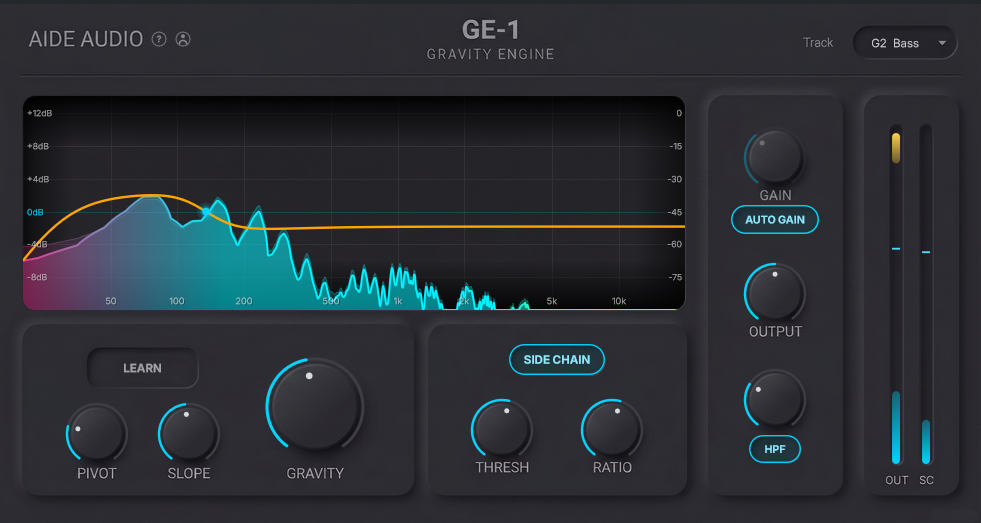
It analyzes the incoming spectrum and automatically finds the pivot that fits the track. A single Gravity knob then tilts low against high like a seesaw, giving you intuitive control over weight and clarity.
Press LEARN and play a few seconds of bass, and GE-1 sets the pivot, sub-cut (HPF), side-chain threshold and ratio, gain reference and kick phase alignment in one step. Clashes with the kick are handled by spectral ducking, which carves only the bass while keeping the overall gravity intact, so both sit together cleanly.
With the kick in the side-chain, AUTO GAIN also sets the bass level against the kick.
Features
01
Gravity (Tilt EQ)
A one-knob tilt EQ. Tilt low against high around the Pivot like a seesaw to control weight and clarity.
02
One-Button LEARN
Play a few seconds of bass and GE-1 finds the pivot from the spectrum, then sets the sub-cut (HPF), side-chain threshold/ratio, auto-gain reference and kick phase alignment in one step.
03
Spectral Ducking
A dynamic curve shaped by the kick's spectrum carves only the bass to make room for the kick, without moving the overall Gravity.
04
Dual Side-Chain / Latency Compensation
Works with both the DAW side-chain input and a path that receives the kick signal from a separate GE-1 instance set to the Kick role. It also reports its latency to the host (PDC) and keeps the same delay when bypassed.
05
Auto-Gain (kick-referenced)
With the kick in the side-chain, LEARN sets the bass level against the kick. Every bass track lands at the same loudness, and it stays put as you move Gravity.
Specifications
- One-knob Gravity (knob range ±50, low and high shelves move in opposite directions by up to ±25 dB each)
- Pivot 20–500 Hz / Slope 0.1–2.0 (auto-set by LEARN)
- Smart Analyze (LEARN) via FFT spectral analysis
- Spectral ducking with bass-presence gate
- Up to 4 groups / up to 4 kicks aggregated per group
- Sub-cut HPF 20–100 Hz (15 ms crossfade)
- 4x oversampled True-Peak soft-clip
- Real-time analyzer overlaying input / output / kick
- AUTO GAIN: kick-referenced loudness matching
Try GE-1's center-of-gravity control with the 3-day free trial.
How It Works
01
Analyze with LEARN
Insert GE-1 on the bass track, press LEARN and play a few seconds of bass. Pivot, sub-cut, ducking and phase are set automatically.
02
Tilt with Gravity
Use the single Gravity knob to balance low against high, dialing in weight and clarity to fit the song.
03
Fit with the Kick
Send the kick to the side-chain input (or a signal from a separate GE-1 instance set to the Kick role) and spectral ducking cuts the bass where it overlaps the kick, clearing low-end buildup automatically.
System Requirements
- OS: Windows 11 or later / macOS 13 (Ventura) or later
- Format: VST3 (Windows / macOS) / Audio Unit (macOS only) / 64-bit
- Internet: Required when starting the trial or activating a serial.
License & Trial
GE-1 is offered with a 3-day free trial and a one-time (perpetual) license.
3-Day Free Trial
Sign in to your account to run a full-feature 3-day trial, available once per user.
One-Time Serial
After purchase, your serial key unlocks GE-1 permanently. No sign-in is required, and the license is tied to your device. Future updates are included.
Up to 3 Devices
A single license activates on up to three devices.
One-Button LEARN. One-Knob Gravity.
Manual
GE-1 User Manual (EN)
Open PDF
Last Updated: Jul 18, 2026
Update History / Details
v1.0.2 (Sep 2, 2026 - Latest)
- Removed the link to our retired Discord community from the feedback panel
- Corrected internal packaging metadata (no changes to sound)
v1.0.1 (Jul 29, 2026)
- Improved ducking response (THRESH and RATIO now change smoothly across their range)
- Optimized low-end ducking, reducing modulation distortion
v1.0.0 (Jul 18, 2026)
- Initial release